Lovense Remote Game Settings

To connect your Lovense device to the game, open your Lovense Remote application on your mobile device connected to the same network as your computer and follow the steps below.

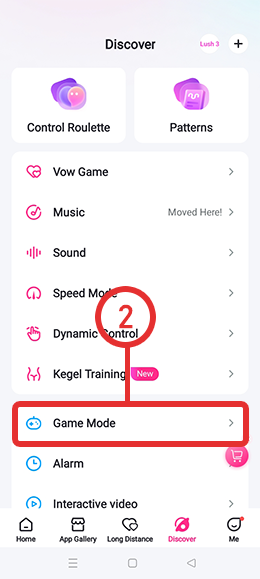
1) Open the Lovense Remote app on a mobile device and pair the hardware. Navigate to the Discover or Settings tab within the app.

2) select the Game Mode feature.

3) Activate the Enable LAN or Allow Control toggle. This will generate a local IP address and port number necessary for the connection.
4) Open the settings menu of the compatible software, locate the device integration options, and enter the local IP and port provided by the mobile app.
5) Click CONNECT BUTTON Note: For the local API to communicate successfully, both the mobile device and the computer or console must be connected to the same Wi-Fi network.
6) Click REFRESH BUTTON and see your connected Lovense devices.